File types
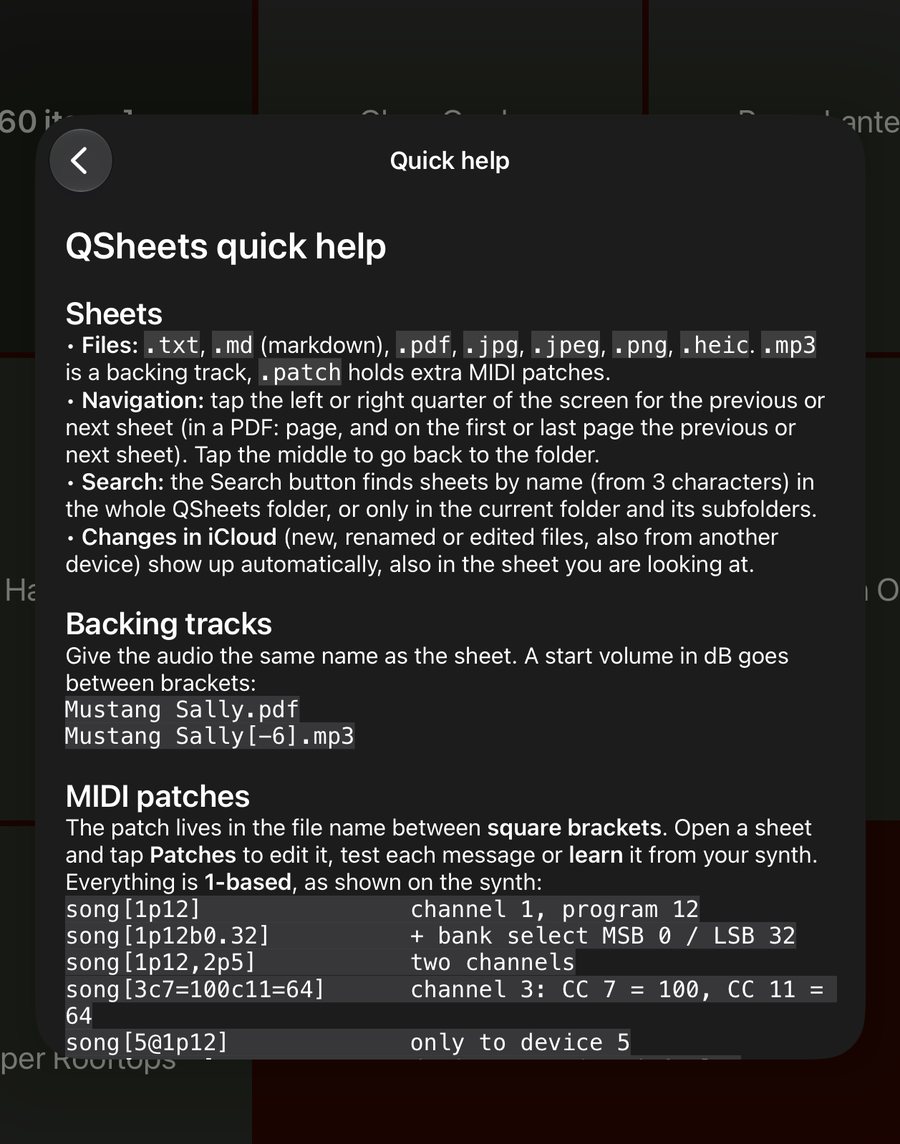
Supported files
| File | What QSheets does |
|---|---|
.txt | Shows the text as large as possible without wrapping. UTF-8 and older Windows/Latin-1 files both work. Light on dark by default; switch it in the settings. |
.md | Markdown at the same maximum size, with headings, bold, italic, lists, quotes, code blocks and colours. |
.pdf | Shows the PDF full screen; left and right turn the pages. |
.jpg .jpeg .png .heic | Shows the image as large as possible, keeping its shape. |
.mp3 | Not a button of its own: it is the backing track of the sheet with the same name. |
.patch | Not a button: extra MIDI patch lines for the sheet with the same name (see MIDI). |
Upper or lower case extensions both work. A folder can hold up to 500 items. Songs are sorted alphabetically, so start names with 01, 02… to set the order of a set list.
Markdown sheets (.md) with colours
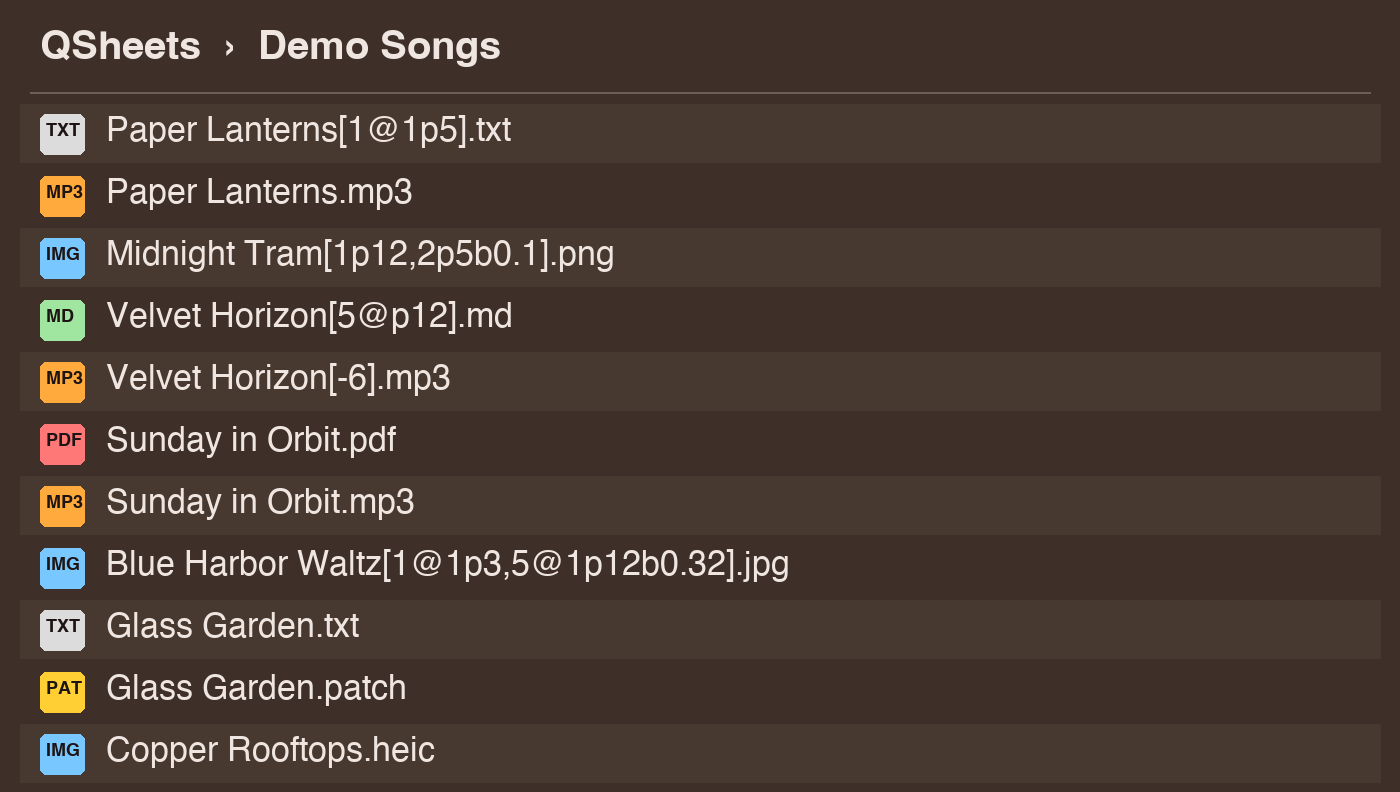
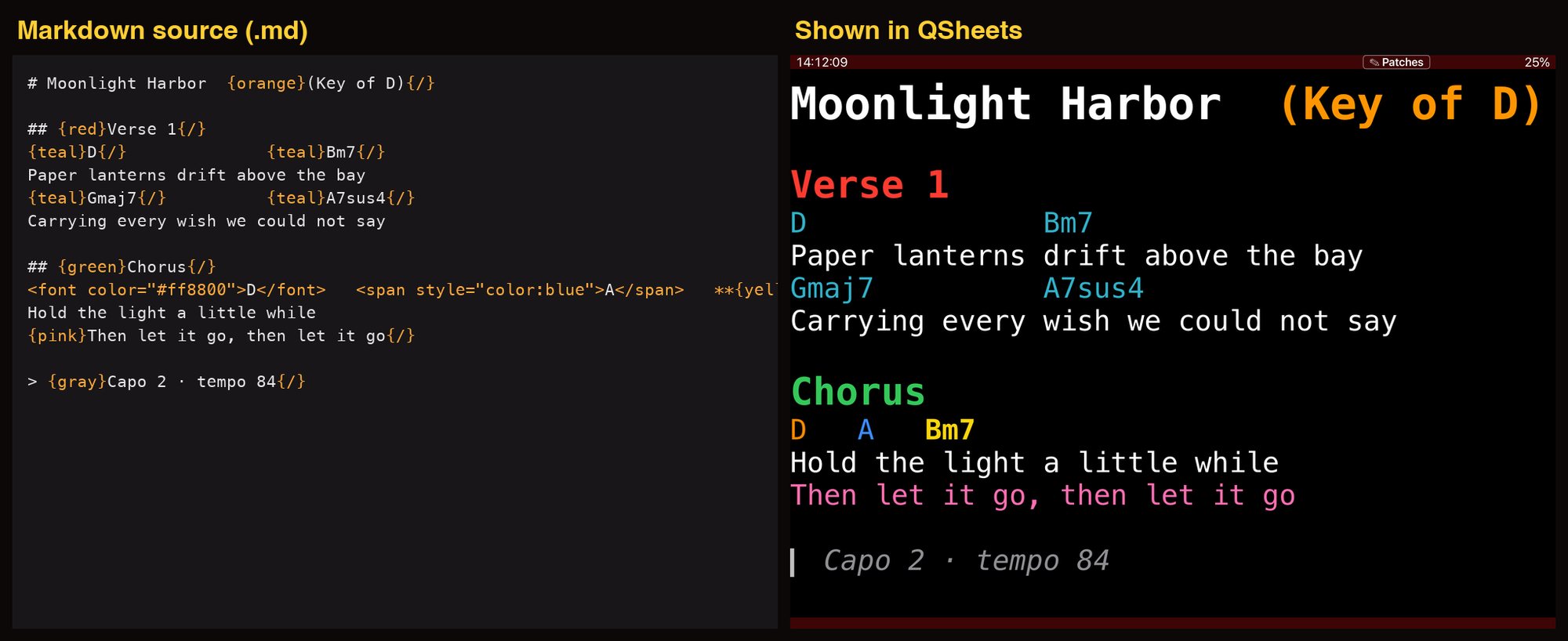
A .md file is shown like a text sheet: monospaced, as large as fits, so chords above lyrics stay aligned. You can use:
# Heading         ## Smaller heading
**bold**  *italic*  ~~strike~~  `code`
- bullet          > quote          ---  (rule)
{red}Am7{/}       {#ff8800}orange{/}
<font color="red">red</font>
<span style="color:blue">blue</span>
Colour names: red, green, blue, yellow, orange, purple, pink, cyan, magenta, white, black, gray, brown, teal, lime, navy, gold, or #rgb / #rrggbb. Fenced blocks (three backticks) keep their spacing, which is handy for bar lines.
MIDI patches
Connecting
Use the USB (camera connection) adapter with a class-compliant USB MIDI interface or a USB hub with several keyboards, Bluetooth MIDI, or a host app that offers a virtual MIDI port. By default QSheets sends every message to all connected devices; give devices a number (below) to address them one by one.
Notation
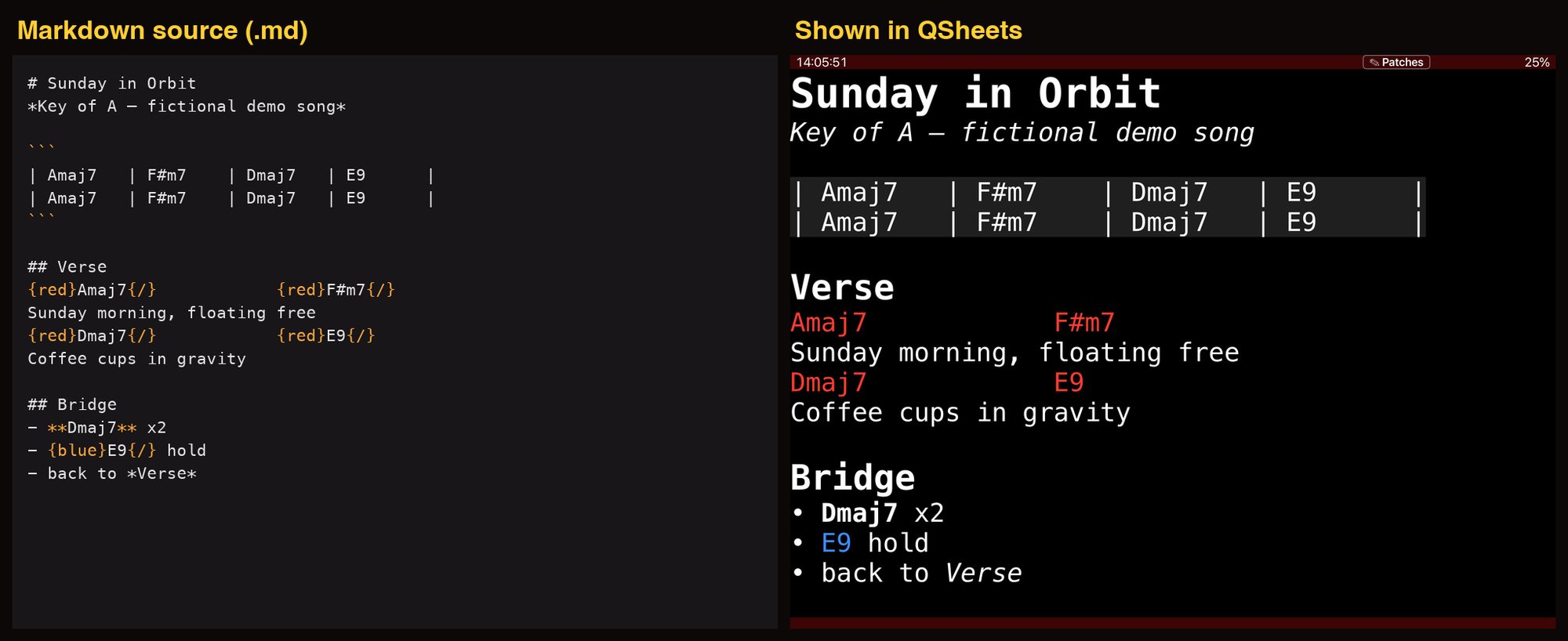
Put the patch between square brackets (angle brackets are not allowed in Windows file names; old files that use < > still work). Everything is 1-based, as shown on the synth:
song[1p12]                channel 1, program 12
song[1p12b0.32]           + bank select MSB 0 / LSB 32
song[1p12,2p5]            two channels
song[3c7=100c11=64]       channel 3: CC 7 = 100 and CC 11 = 64
song[5@1p12]              only to device 5: channel 1, program 12
song[5@p12]               device 5 on its default channel
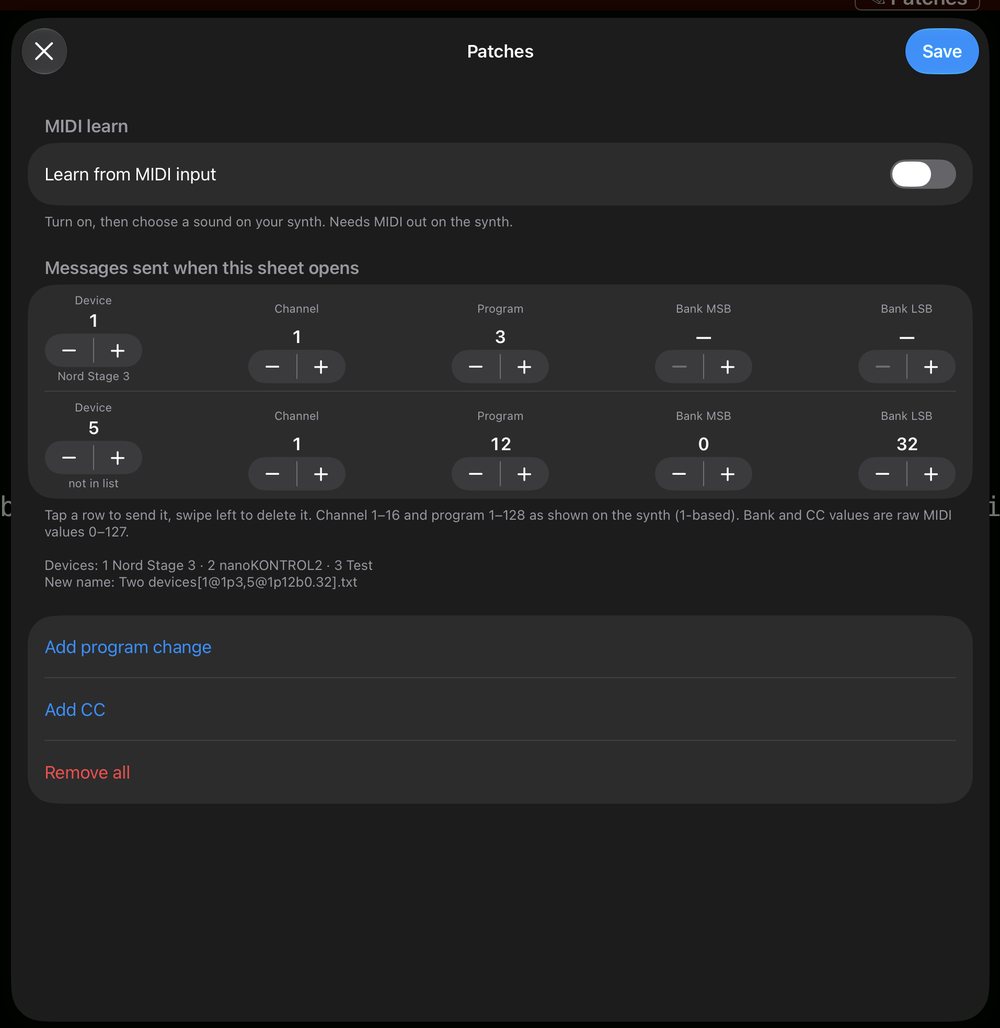
song[1@1p3,5@1p12b0.32]   device 1 and device 5
Channel 1-16, program 1-128 (sent as 0-127), bank, CC number and CC value 0-127. A message without n@ goes to all connected devices.
Edit and learn
Open a song and tap ✎ Patches. Each message is a row you can change, test (tap the row) or delete (swipe left). Turn on Learn from MIDI input and choose a sound on your synth: the program change, bank select and any controllers you move are added as rows. Save writes the patch into the file name. This needs the synth to send MIDI out, which many synths can switch on in their MIDI settings.
MIDI devices
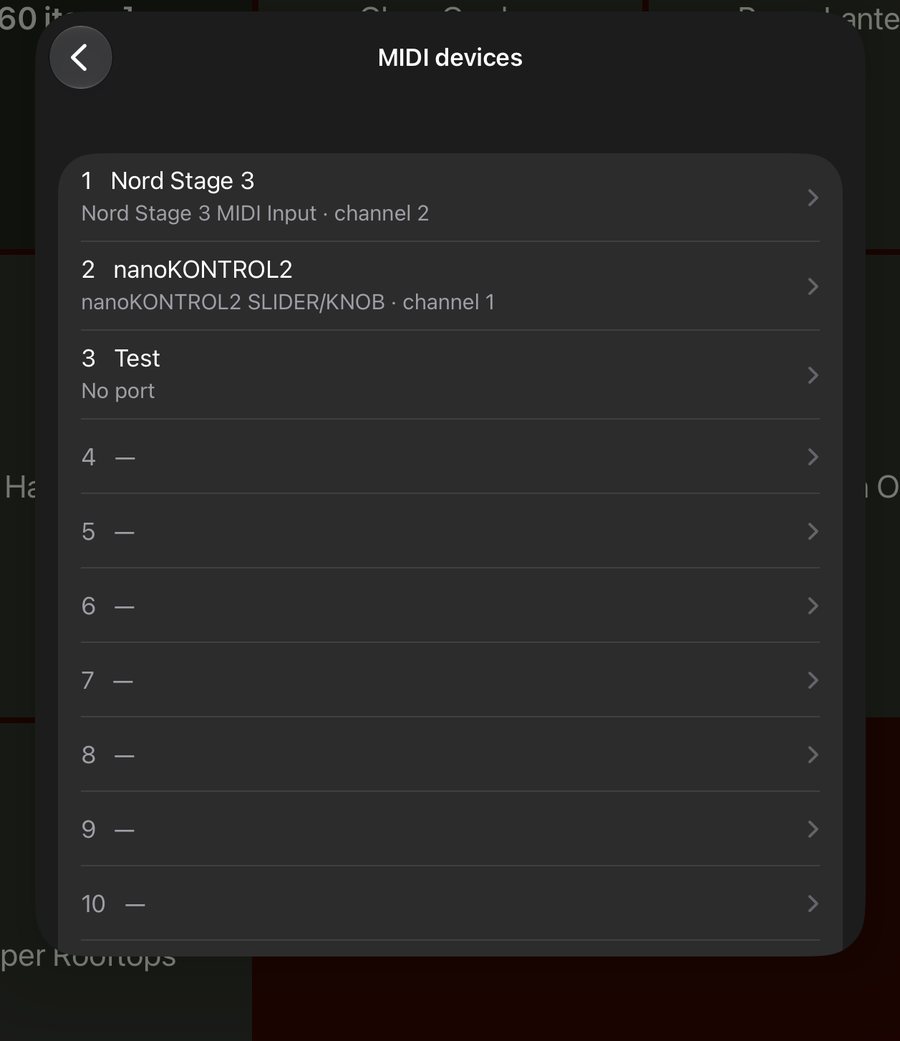
In ☰ → MIDI devices you can give up to 16 devices a number. Choose the MIDI port (the one that ends in Input), a name, and optionally a default channel, so [5@p12] works without a channel. The list is saved as QSheets-devices.json in your iCloud folder and shared by all your iPads. Use Send test note to check that the right device reacts.
Long patches
When a patch would make the file name longer than 60 characters, Save writes it to song.patch next to the sheet instead: one message per line, the same notation, and # starts a comment.
# QSheets patch file
1@1p12b0.32c7=100c11=64
5@1p3b0.1c7=90c74=80
2@p5
Both the tag and the .patch file are read. If the patch becomes short again, the file is removed.
Older notations
These keep working and the editor leaves them untouched.
| Type | Parameters | Example |
|---|---|---|
PC | CH channel 1-16, PC program 0-127 (raw). Optional bank select: BM MSB and BL LSB, 0-127, both needed. | PC-CH11-PC32PC-CH2-PC32-BM2-BL0 |
NS3 NW2 | CH channel 1-16 and the program as shown on the Nord Stage 3 or Nord Wave 2, like A43. | NS3-CH1-A21NW2-CH2-B31 |
NS4 | CH channel 1-16 and the program as shown on the Nord Stage 4, like I88. | NS4-CH11-E88 |
MT | MIDI thru: notes and CC coming in on this channel (1-16) are sent on to all outputs while the song is open. | MT13 |
Quick format for Nord keyboards. Only the program numbers, three characters each, without dashes. The position is the MIDI channel: the first program goes to channel 1, the second to channel 2, and so on. Use upper case for Nords with 5-based numbers (Nord Stage 3, Nord Wave 2, Nord Piano 5) and lower case for 8-based numbers (Nord Stage 4), for example Mustang Sally[C11B23a11].txt.
The buttons simply read the song name: the part between brackets is hidden.
MIDI devices
- Up to 16 numbered devices: pick the MIDI port, give it a name and optionally a default channel.
- Stored in iCloud (
QSheets-devices.json), so all your iPads share the same list. - Use the number in a patch:
[5@1p12]goes to device 5 only.
Settings and themes
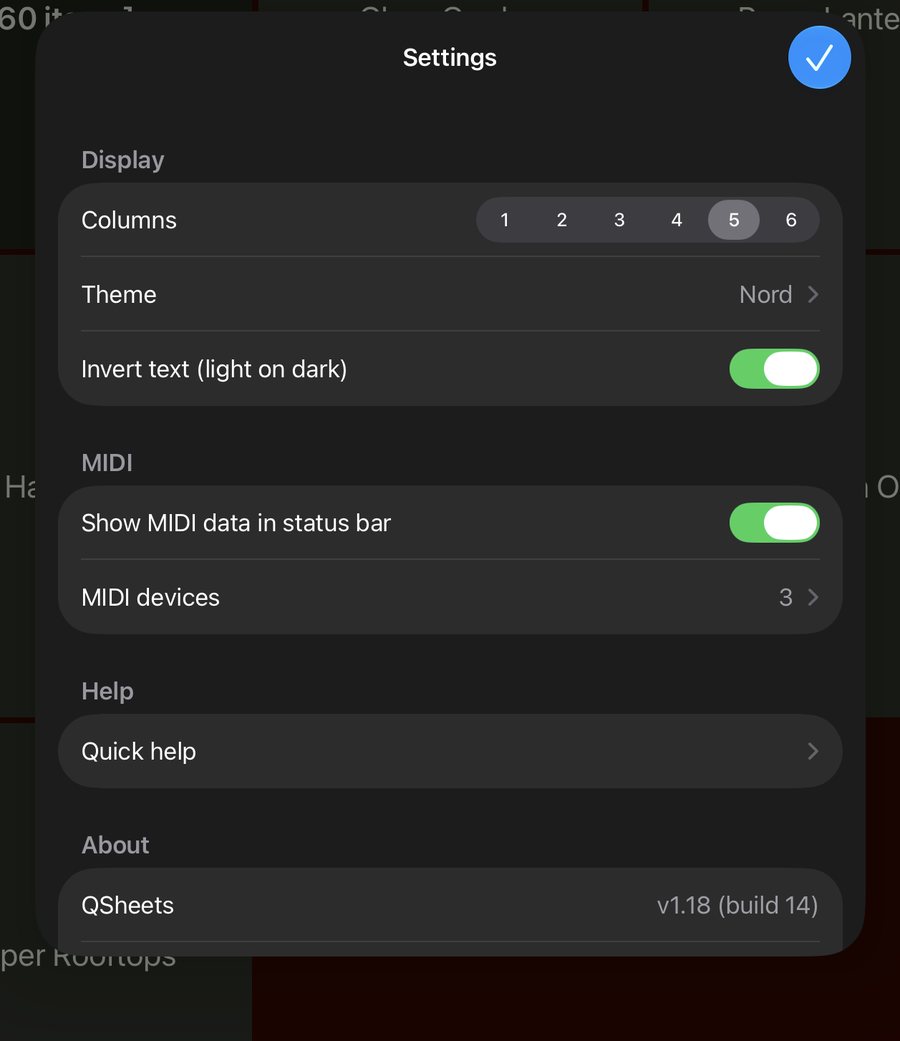
Tap ☰ at the top of the folder view:
- Columns: the number of columns in the folder view, 1 to 6 (default 5 on iPad, 2 on iPhone).
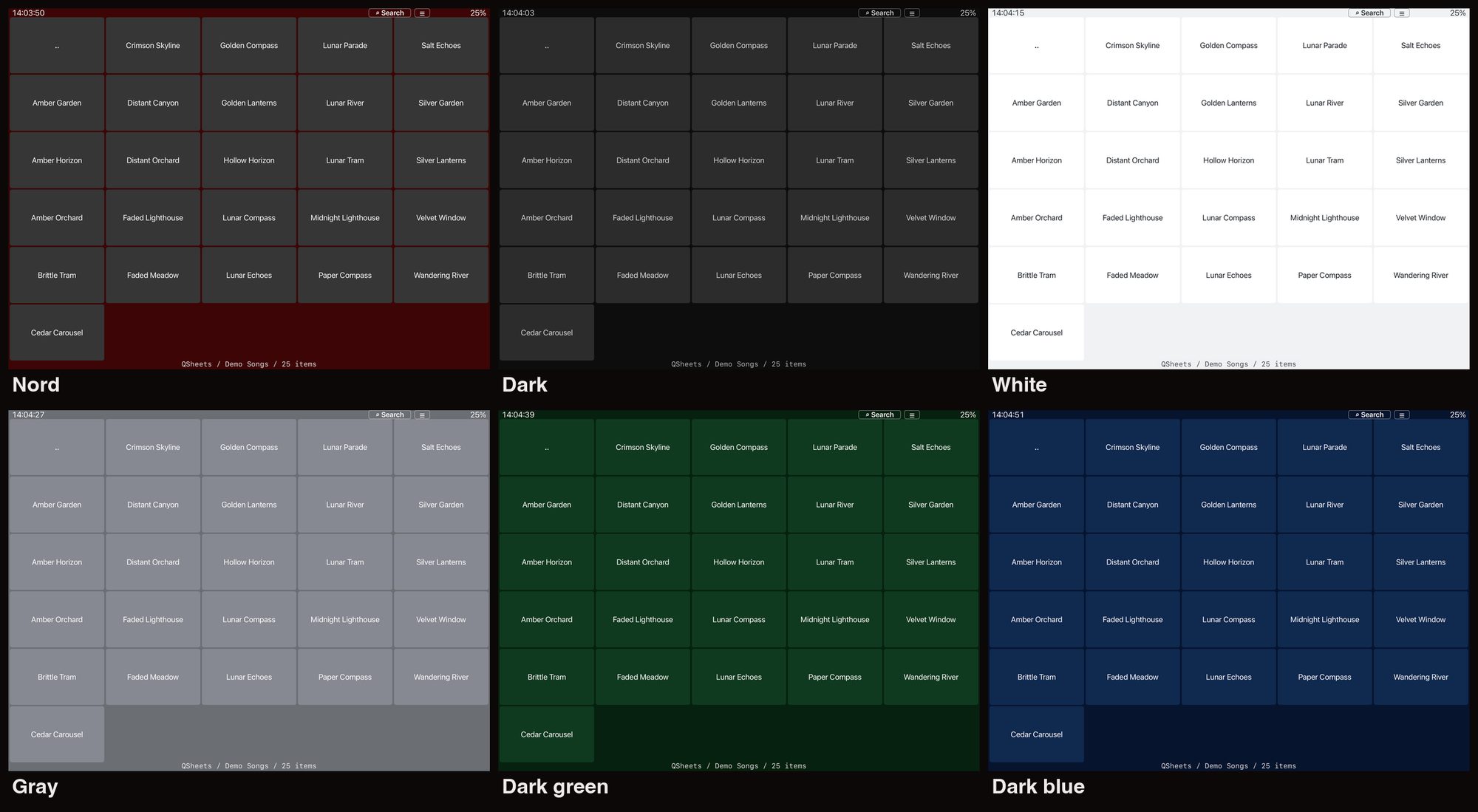
- Theme: Nord, Dark, White, Gray, Dark green or Dark blue.
- Invert .txt and .md sheets (light on dark): how
.txtand.mdsheets are drawn. - Show MIDI data in status bar: shows incoming MIDI messages at the top of the screen.
- MIDI devices: the numbered device list (see MIDI).
- Quick help: the file name reference, inside the app.
- About: version and build number, and links to the App Store and this website.
- Setlists: edit setlists directly, or only after pressing Edit.
- iCloud: keep all songs downloaded for offline use (on by default).
Quick help in the app
The whole reference is also in the app: ☰ → Quick help.